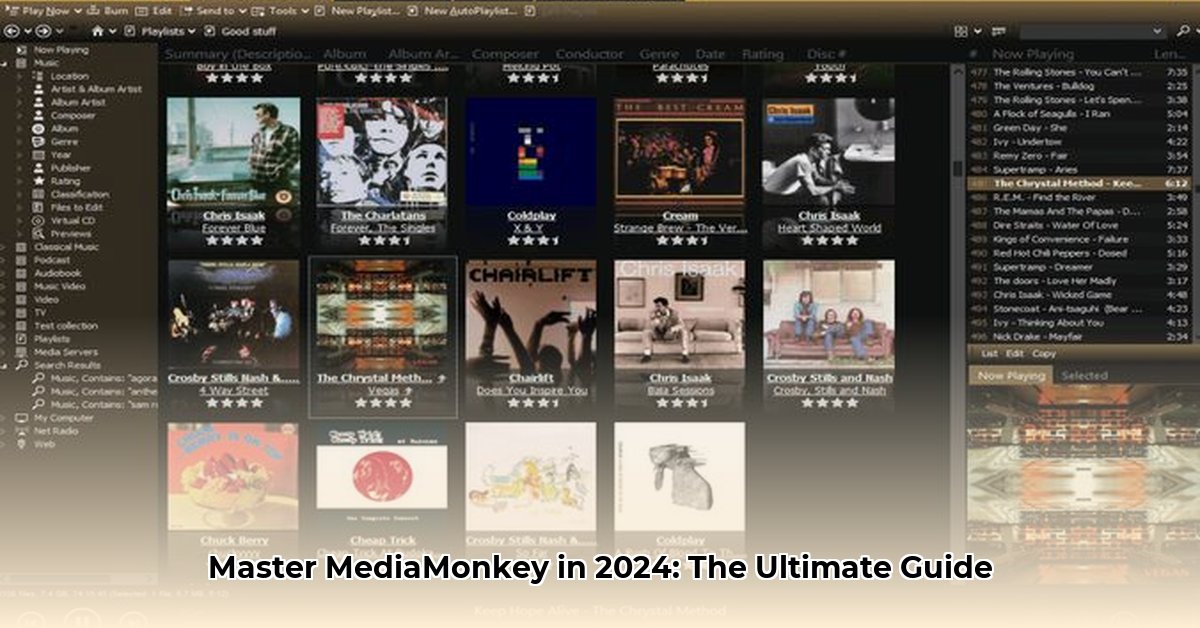
MediaMonkey for Windows is a powerful media management application ideal for serious collectors, but its complexity can be daunting. This review provides a detailed walkthrough, blending technical explanations with straightforward instructions to help you master this versatile, albeit challenging, software.
MediaMonkey Windows: A Deep Dive into Features and Functionality
MediaMonkey offers extensive features for organizing and managing your digital media library. While powerful, its learning curve can be steep. This section will break down key features with step-by-step instructions.
Mastering Metadata: Precision Tagging for Effortless Organization
Precise metadata (data about your media files such as artist, album, genre, etc.) is crucial for effective media management. MediaMonkey excels in this area.
How to Edit MP3 Tags:
- Locate the File: Find your MP3 file within the MediaMonkey library.
- Access Properties: Right-click the file and select "Properties."
- Edit Tags: Navigate to the "Tags" tab. Modify or add artist, album, title, genre, and other metadata fields. You can also import metadata from online databases to automate this process. Drag and drop album art directly into the designated space.
- Save Changes: Click "OK" to save your edits. MediaMonkey will automatically update your library.
This feature transforms your library's searchability, enabling you to instantly locate specific tracks or albums.
Audio Conversion: Transforming Your Soundscape
MediaMonkey supports batch audio conversion, allowing you to easily change formats (e.g., MP3 to FLAC) or adjust bitrates for optimal file size and audio quality. This is particularly useful for optimizing your library for different devices.
Conversion Steps (Simplified):
- Select Files: Choose the files you wish to convert.
- Convert: Select the desired output format and settings (bitrate, sample rate, etc.).
- Start: Initiate the conversion process. MediaMonkey will process the files one by one.
This functionality streamlines the process of adjusting your audio library to suit your needs. Why settle for lower quality when you can maintain fidelity and optimize space?
Playlist Creation: Curating Your Perfect Soundtrack
Beyond simple drag-and-drop playlists, MediaMonkey allows for the creation of dynamic "smart playlists" that automatically update based on your listening habits or criteria you define (genre, rating, etc.). This keeps your playlists fresh and relevant.
Smart Playlist Creation (Simplified):
- New Playlist: Create a new playlist.
- Smart Playlist Options: Choose to create a smart playlist.
- Define Criteria: Set the criteria for the playlist (artist, genre, year, etc.).
- Save: Save the playlist and its criteria. MediaMonkey updates the playlist automatically.
This feature ensures your ideal listening experience remains effortlessly up-to-date.
Syncing Across Devices: Unified Music, Anywhere
MediaMonkey facilitates seamless syncing between your Windows PC and other devices (Android, iOS), ensuring your library is accessible across multiple platforms. This eliminates the need for manual file transfers.
MediaMonkey prioritizes maintaining your unified music experience across your devices. What other media player could achieve this level of seamless integration?
Advanced Features: Deep Control and Customization
Advanced features include a 10-band equalizer for fine-tuned audio adjustments, DSP effects, and powerful automation tools. While potent, these features require a steeper learning curve and thorough exploration of MediaMonkey's documentation.
These features offer granular control over your audio, perfect for audiophiles seeking a customizable listening environment. However, mastering them requires dedication and a willingness to explore its extensive options. Does this level of customization justify the increased complexity?
Ease of Use and Learning Curve: Addressing the Complexity Issue
Though powerful, MediaMonkey's steep learning curve is a notable drawback. Its interface can feel overwhelming to newcomers. Improved onboarding and more comprehensive tutorials would significantly enhance user experience. A simplified "beginner mode" focused on essential features would be a valuable addition.
Is there anything more frustrating than a powerful program that feels impossible to learn? A more user-friendly onboarding process would dramatically impact its accessibility.
MediaMonkey vs. the Competition: A Comparative Analysis
Compared to iTunes or MusicBee, MediaMonkey offers significantly more advanced features and customization options. However, this comes at the cost of increased complexity. Simpler alternatives might better suit casual listeners. For those who demand absolute control and extensive features, the effort of learning MediaMonkey is justified.
Consider this: which program prioritizes your specific workflow? MediaMonkey's advanced capabilities often outweigh the effort required to learn them, depending on your priorities.
Conclusion: Is MediaMonkey Right for You?
MediaMonkey is an exceptionally powerful tool for serious music collectors who value extensive customization and control over their digital libraries. Its complexity makes it unsuitable for casual users who prioritize simplicity. It’s an instrument that rewards mastery, but requires significant investment in time and effort to learn.
Frequently Asked Questions (FAQ)
- Is MediaMonkey free? A free version exists with limitations; the "Gold" version unlocks full functionality.
- What operating systems are supported? Currently, only Windows 10 and 11 are supported.
- Can I use it with external storage? Yes, MediaMonkey supports external hard drives without issue.
How to Organize Large Media Libraries Using MediaMonkey
This section outlines a phased approach to importing and organizing large music libraries using MediaMonkey to ensure a smooth and efficient process. Proper tagging is paramount.
Key Takeaways:
- Import in phases to avoid overwhelming the application.
- Accurate metadata tagging is essential.
- Use automation tools cautiously; manual intervention is often required.
- A well-structured file system (e.g., Artist/Album/Track) simplifies organization.
Remember, effective organization requires patience and attention to detail, but the result is a well-managed and easily searchable music library.
⭐⭐⭐⭐☆ (4.8)
Download via Link 1
Download via Link 2
Last updated: Saturday, May 10, 2025